

Xactimate PDF to ESX Converter
In the fast-paced insurance restoration and construction estimation industry, efficiency and speed are essential. Contractors, public adjusters, and insurance carriers routinely exchange detailed cost proposals, scope documents, and scope of loss notes. However, a significant challenge arises when estimates are delivered in standard PDF format rather than native, editable software files. Manually re-entering line items from a static document into Xactimate is tedious, time-consuming, and prone to costly human error. With professional Matterport to Xactimate sketch solutions and reliable Xactimate estimating services, contractors and restoration professionals can streamline the estimation process, improve accuracy, and save valuable time.
At MX Estimation, we eliminate this friction by providing high-accuracy conversion workflows and professional estimation services. Whether you need to convert historical PDF bids, import third-party loss adjustments, or re-key extensive multi-trade scopes, our specialized Xactimate PDF to ESX converter process converts static project documents into native Xactimate files. This guide explains how file conversions work, how to properly handle native project formats, and how contractors and claims adjusters can streamline their estimating operations.
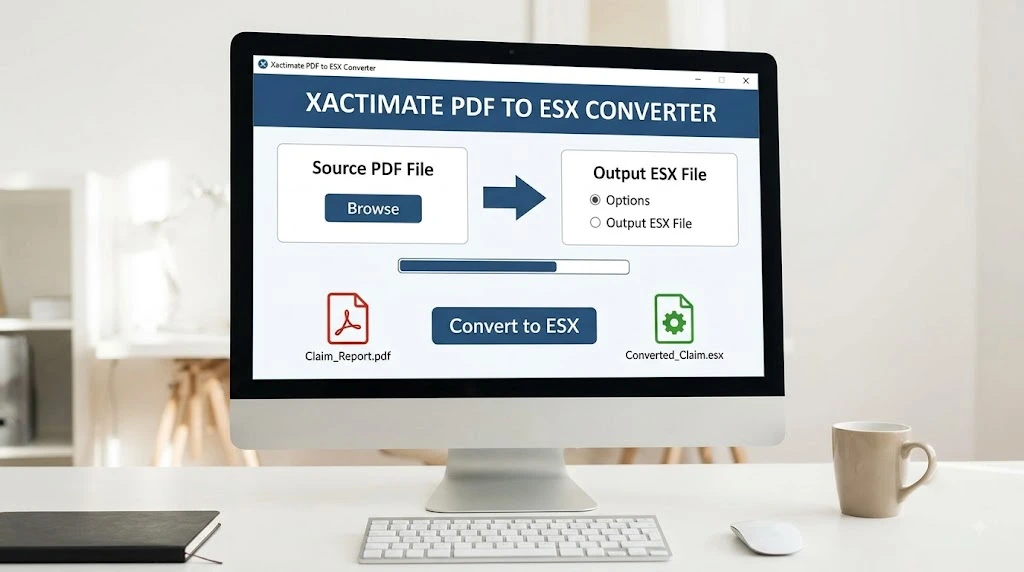
INDUSTRY INSIGHT: Converting static PDF scope sheets into native Xactimate ESX files saves hours of manual data entry, eliminating human error while maintaining 100% price database and trade code accuracy.
Understanding the ESX File Format in Xactimate
To understand the value of file conversion, it is important to know what an esx file actually is. An esx file is the proprietary compressed data container used by Verisk’s Xactimate software to store complete project data. Unlike a basic flat PDF document, an ESX file contains rich structural metadata, including sketch layouts, line item quantities, unit pricing structures, trade codes, waste factors, contractor overhead and profit (O&P) settings, and claim header information.
When an adjusting firm or contractor asks you to send a project, they typically expect an ESX file so they can modify line items, apply updated price lists, or merge scopes. If you receive an ESX container from an outside partner, knowing how to open ESX file packages within your Xactimate dashboard is critical. You simply import the file through the Data Transfer utility or the Control Center, allowing Xactimate to reconstruct the complete estimate with active formulas and price list bindings. For projects that require additional estimating support, professional Symbility Estimating Services can also help ensure accurate, efficient, and properly documented estimates across different insurance platforms.
Professional Xactimate - MX Estimation
As a high-volume restoration contractor, line-item entry was absolute death to our workflow. We were constantly bottlenecked trying to manually rebuild massive PDF estimates from adjusters just so we could supplement the missing line items. EstimateHub changed the game entirely. I drop the PDF in, get the ESX back in minutes, and pull it straight into Xactimate ready to edit. What used to take our estimating team 8–10 days of grueling administrative drag now gets out the door in under 48 hours. Absolute lifesaver for our cash flow!
I’ve been in construction and insurance claims for over 15 years, and manually recreating 40-page adjuster estimates was easily the worst part of my job. EstimateHub completely eliminated that headache overnight. Converting their static PDFs into a fully editable ESX file lets me jump right into tweaking pricing and adding missed scope items instead of typing line after line. Our team transformed a 7-day estimating backlog into a smooth 2-to-3-day workflow. 10/10 tool for any serious contractor!
If you run a mitigation firm, you already know the nightmare of adjusters refusing to share their native files. We were burning countless hours having our project managers hand-key entire Xactimate scopes from scratch just to show our revisions. Since adopting EstimateHub, that entire friction point is gone. We upload the estimate, download the converted ESX, and jump straight into scope revisions. Our average turnaround dropped from a sluggish 9 days down to 2 days flat. I honestly don’t know how we operated without it.
We handle dozens of large-loss water and fire restoration claims a month, and the biggest bottleneck in our process was always rebuilding adjuster estimates word-for-word before adding missing scope items. EstimateHub eliminated that entire bottleneck. Now, we upload the PDF, grab the generated ESX file, and load it straight into Xactimate in a fraction of the time. Our turnaround time dropped from a painful 8–10 business days down to just 2 days. It gives us a massive edge over local competitors still doing manual entry.
Why Convert PDF Estimates to Native ESX Containers
While PDFs are fantastic for viewing and printing hard copies, they lack dynamic data capabilities. Here is why converting a PDF into an ESX file is essential for modern estimation workflows:
- Full Editability: Convert static text into active line items that can be re-priced, adjusted, or expanded.
- Price List Flexibility: Automatically recalculate regional labor and material rates by updating the attached price database.
- Sketch & Scope Integration: Preserve dimensioning structures and room assignments without rebuilding geometry from scratch.
- Rapid Claim Processing: Insurance carriers and third-party administrators require native files for automated audit checks.

Simple Pricing for to your business
Package Pricing
Pay-As-You-Go
Package Plan. No monthly fee
| 1 × PDF to ESX conversion — $0 |
| 1st conversion is FREE |
| Email Support |
| FREE Sketch Included |
1 Pack | $40 | Package Plan. No monthly fee.
| $40 per file |
| Email Support |
| FREE Sketch Included |
5 Pack | $175 | Package Plan. No monthly fee.
| 5 × PDF to ESX conversions |
| $35 per file |
| Email support |
| FREE Sketch Included |
Monthly
Subscribe Monthly & Save 29%–75%
Standard Plan $300/Month
| 10 PDF → ESX Conversions |
| $30 per additional file |
| FREE Sketch Included |
| Email & Phone Support |
Pro Plan $500/Month
| 20 PDF → ESX Conversions |
| $25 per additional file |
| 01–400 Line Items |
| FREE Sketch Included |
| Email & Phone Support |
Enterprise Plan $800/Month
| 40 PDF → ESX Conversion |
| $20 per additional file |
| 01–500 Line Items |
| FREE Sketch Included |
| Email & Phone Support |
Step-by-Step: How to Import a PDF Bid into Xactimate
Contractors frequently ask how to import a pdf bid into xactimate directly. While Xactimate X1 has expanded document import capabilities for underlying visual reference images, direct structural import of a flat text PDF into a live line-item estimate requires precise data mapping.
Option B: Native Reference Import within Xactimate X1
If you want to use a PDF as an underlay for manual sketching inside Xactimate X1, you can import the PDF into the Sketch window. Navigate to the Sketch tab, select ‘Import Underlay Image/PDF’, scale the document dimensions using a known wall length, and trace over the plan. However, for full line-item reconstruction, converting the document to an ESX container through MX Estimation remains the fastest option.
Option A: MX Estimation Professional Conversion Service
- Submit Your PDF: Send your target PDF estimate, scope sheet, or subcontractor bid to MX Estimation.
2. Automated OCR & Manual Verification: Our proprietary tool parses line items, matching them against standard trade categories, selector codes, and price list items.
3. Quality Assurance Audit: Our certified Xactimate estimators review every line item to ensure quantities, unit measures, and descriptions align perfectly.
4. ESX File Delivery: You receive a clean, native .ESX file ready to import into your Xactimate X1 system within hours.
Mastering Xactimate Line Item Codes and Reference Manuals
A central component of accurate PDF-to-ESX conversion is correct line item coding. Xactimate uses a standardized system composed of Category Codes (e.g., DRY for Drywall, WTR for Water Extraction, RFG for Roofing) and Selector Codes (e.g., 1/2 for 1/2″ drywall installed & finished).
When performing conversions or manually building estimates, having access to an updated xactimate codes pdf or a comprehensive xactimate x1 line item codes list pdf is invaluable. These reference lists allow estimators to quickly cross-reference non-standard contractor descriptions with official Verisk item codes.
To build team competency and maintain strict estimating compliance, we recommend keeping standard training resources on hand. Studying an official xactimate training manual pdf or an interactive xactimate training workbook pdf helps estimators master rapid entry, complex macros, global variables, and pricing updates.
Common Xactimate Category & Line Item Quick Reference
|
Category Code |
Description |
Common Selector Codes |
|
DRY |
Drywall & Gypsum Board |
DRY 1/2, DRY 5/8, DRY PATCH |
|
RFG |
Roofing Materials & Repair |
RFG 300, RFG ARL, RFG FELT15 |
|
WTR |
Water Extraction & Remediation |
WTR DEHUM, WTR FAN, WTR EXT |
|
PNT |
Painting & Surface Finishing |
PNT P2, PNT M2, PNT M |
Managing Export Workflows: PDF Generation and Emailing in Xactimate
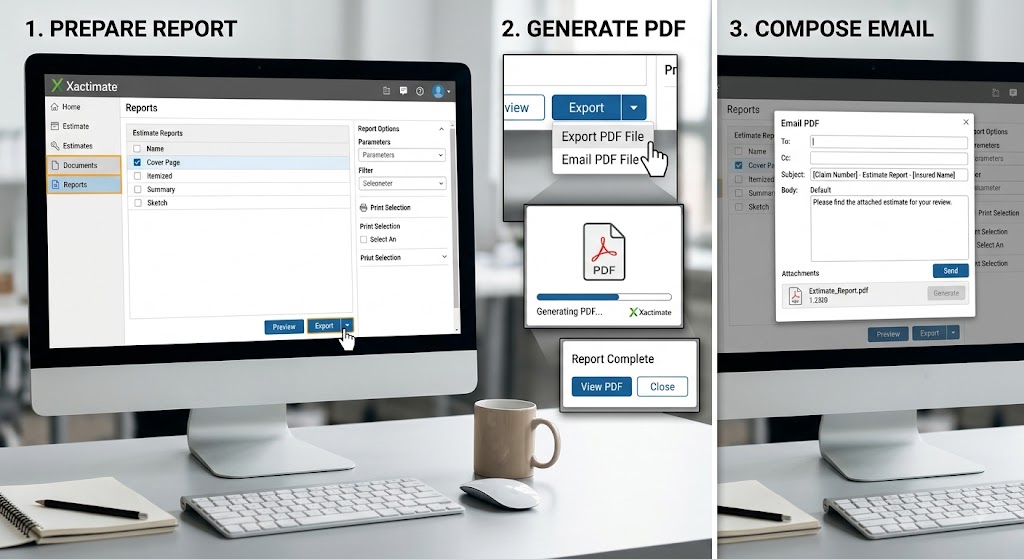
Once your ESX file is imported or modified, sharing your finalized estimate with clients, adjusters, or policyholders requires exporting. Knowing how to efficiently export documents directly out of Xactimate saves substantial time during daily administrative routines.
Many estimators rely on the built-in export features to xactimate save and pdf an email in a single streamlined action. In Xactimate X1, navigate to the ‘Reports’ or ‘Print/Export’ tab, select your preferred document template (such as Estimate Final with Summary), and click the Export to PDF icon. You can configure your default mail client so that when you trigger the xactimate save and pdf and email command, the software automatically attaches the newly created PDF report to an outbound draft addressed to your adjusters or project managers.
How MX Estimation Elevates Your Estimating Pipeline
MX Estimation is a premier provider of construction estimating, insurance claim scoping, and Xactimate consulting services. We support general contractors, restoration professionals, public adjusters, and attorneys across North America.
Our core services include:
• Rapid PDF to ESX Conversion: Fast turnaround times to convert external PDF bids into native, editable ESX packages.
• Full Xactimate Scope Writing: Complete line-item estimate creation for water, fire, storm, and mold damage restoration claims.
• Supplement Preparation: Detailed line-item justification and photo-backed documentation to secure full project funding.
• Customized Code Auditing: Utilizing our comprehensive xactimate x1 line item codes list pdf databases to maximize legitimate scope recovery.
Frequently Asked Questions (FAQ)
Q1: How do I open an ESX file sent to me by MX Estimation?
To open an esx file, launch Xactimate X1, go to the Projects tab, click on ‘Tools’ or ‘Data Transfer’, select ‘Import Project’, and browse to the downloaded .esx file. Once imported, the project will immediately appear in your active claims list.
Q2: Can I convert scanned or handwritten PDF bids into ESX format?
Yes! At MX Estimation, our hybrid conversion process combines advanced Optical Character Recognition (OCR) technology with human certified estimator reviews. We can accurately convert crisp digital PDFs as well as scanned paper documents and field notes.
Q3: Where can I download an official Xactimate training manual PDF?
Official training resources, including the xactimate training manual pdf and xactimate training workbook pdf, are available through Verisk’s official learning portal or certified Xactimate training partner programs. MX Estimation also offers standard reference guides for ongoing team training.
Q4: Will converted ESX files match my local price list?
Yes, When we deliver your converted ESX file, you can easily re-bind or update the estimate to match your specific regional price list and tax jurisdiction within seconds.